

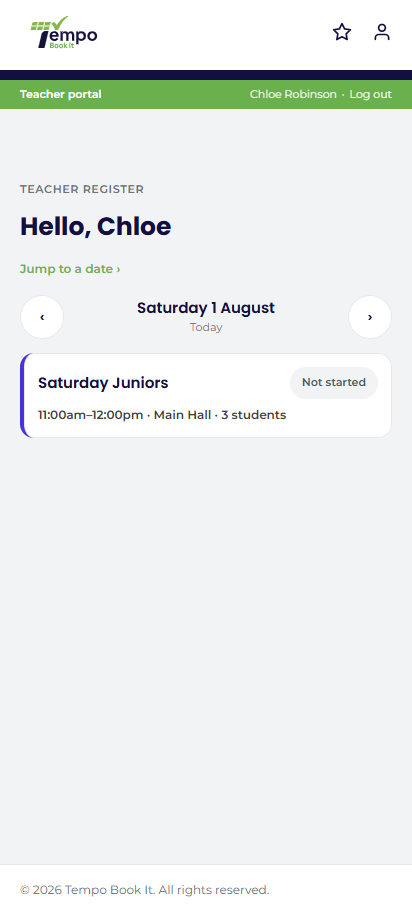
Nobody carries a laptop to the sports hall. Nobody balances a tablet on a pile of crash mats, either. What a coach actually has at the door of a session is one hand, one phone, a queue of children arriving in no particular order, and about four seconds per name.
Before we designed the register in Tempo Book It, we spent a season watching coaches and teachers take registers for real, at the working dance and theatre school the plugin was built alongside. Not asking them what they wanted in a meeting, but watching what their thumbs did at ten to five on a Tuesday. Almost everything about our register page comes from that season. Here is what we learned.
The register is a doorway task, not a desk task
The first observation was the most important: the register is taken standing up, in the doorway, while the session is starting. Anything that assumes a seated user with a keyboard has already failed. So the register in Tempo Book It is a phone-first web page, not a corner of the admin dashboard. Coaches never see wp-admin at all. They open one page in the browser they already have, and it shows today's sessions with their own classes first, because a coach's first question is always "where's my class list?", never "show me the whole timetable".
Sports-hall wi-fi got a vote too. The page works completely without JavaScript, and when JavaScript is available it autosaves as you go. A dropped connection at the door should cost you nothing but a moment, never a register.
Big names, one tap
Watch someone mark twenty children in under a minute and you see why register design is mostly typography. Names need to be big enough to read at arm's length while a child tugs your sleeve, and beside each one sits the photo the parent uploaded, so a coach covering an unfamiliar class can match a face to a name at a glance rather than calling out surnames like a supply teacher. Marking needs to be one tap: Present, Late or Absent, as chips beside each name, no drop-downs, no confirm dialogs, no save button to remember. When the whole class turns up, "mark all present" does the honest thing in one go and you correct the stragglers afterwards.
Real doors also produce children who are not on the list. A trialist arrives with a parent who "spoke to someone last week"; a sibling gets dropped into the session because of a car-share muddle. Coaches told us the worst feeling is having nowhere to put that child, so the register takes walk-ins and trials by name on the day, and a headcount check lets the coach confirm that the bodies in the room match the marks on the screen. Any mismatch is the moment to look up, not a report to discover on Friday.
The medical note exactly where a thumb expects it
The tension in every register design is that the same page must be casually fast for attendance and genuinely careful with the most sensitive data a club holds: emergency contacts, medical conditions, collection notes.
Our answer is an amber dot. If a child has a medical note, a small amber marker sits beside their name, in the spot a scanning thumb naturally passes. It tells the coach that something exists without revealing a word of it to anyone glancing at the screen. Tapping through to the protected profile asks for the coach's own four-digit PIN, which opens a timed access window, enforced by the server, on that device only. Every single view is logged, and repeated wrong PINs lock access. Behind all of that, the medical and contact fields themselves are stored encrypted, and if encrypted data ever cannot be read, it fails safe: the system will say it cannot read the note, and never quietly display "no conditions" for a child who has one.
That last detail matters more than any feature bullet. A register that shrugs and shows a blank where an allergy should be is worse than a paper folder. Ours refuses to.
Absences arrive before the children do
The paper-register ritual we most wanted to kill was the relay race: parent texts the office, office texts the coach, coach forgets, child is marked absent-unknown, office rings a worried parent who already called. In Tempo Book It, a parent reporting an expected absence flags the register directly, so the coach opens the page and finds that child already marked before the session starts. The place is kept, the office note is attached, and nobody chases anybody.
Notes flow the other way too. A coach can send a note to the office from the register itself ("Ella's grandad collected her", "radiator leaking again") instead of trying to remember it two hours later in the car park.
Honest marks, locked days
A register is also a safeguarding document and, for plenty of clubs, the raw material of gradings and progress decisions, so its truthfulness matters after the session as much as during it. Completing a register converts untouched pre-reports into real marks, unmarked is never silently treated as present, and past days lock at midnight. Attendance history then flows into per-student and per-class reports without anyone copying anything anywhere. If it happened at the door, it is in the record; if it did not, it is not.
What we deliberately left out
There is no app to install, because coaches change phones, forget passwords and coach at clubs that will not pay per-seat app fees; a browser page needs none of that. And there is no editing of last month's marks, because a record you can quietly rewrite is not a record.
The result is not a flashy screen. It is a page a coach stops noticing after the second week, which was always the goal. The best compliment our register ever gets is that nobody mentions it: the children get marked in, the amber dot is there on the day it matters, and the coach's attention goes where it belongs, on the session, not the software.
Be the first to comment Hide comments