

Browse docs
Checkout, reservation holds and the countdown
How places are held while a family pays, and why a class can never be overbooked.
The moment a member clicks Add to checkout, Tempo reserves every place in that booking. This article explains the hold system and the checkout page itself, because it's the part members ask about ("am I going to lose the place while I find my card?") and the part you should never have to worry about (no, and nobody can take it meanwhile).
Your site may use different words. Tempo lets you rename class, student and teacher under Settings → Branding & vocabulary; these docs use the defaults.
The hold
- Places are reserved the instant a booking is added to checkout, and held for the temporary reservation period (default 30 minutes, adjustable in Tempo → Settings).
- The hold is decided at the exact moment of adding. Two families racing for the last place can't both get it; the reservation is claimed in a way the database itself guarantees is one-at-a-time.
- Each booking added keeps its own timer. Refreshing the page, browsing on, or adding another class never restarts a countdown.
- When a hold expires, the places go straight back on sale and the expired item is removed from checkout with a clear message; an expired item can never be paid for.
The checkout page
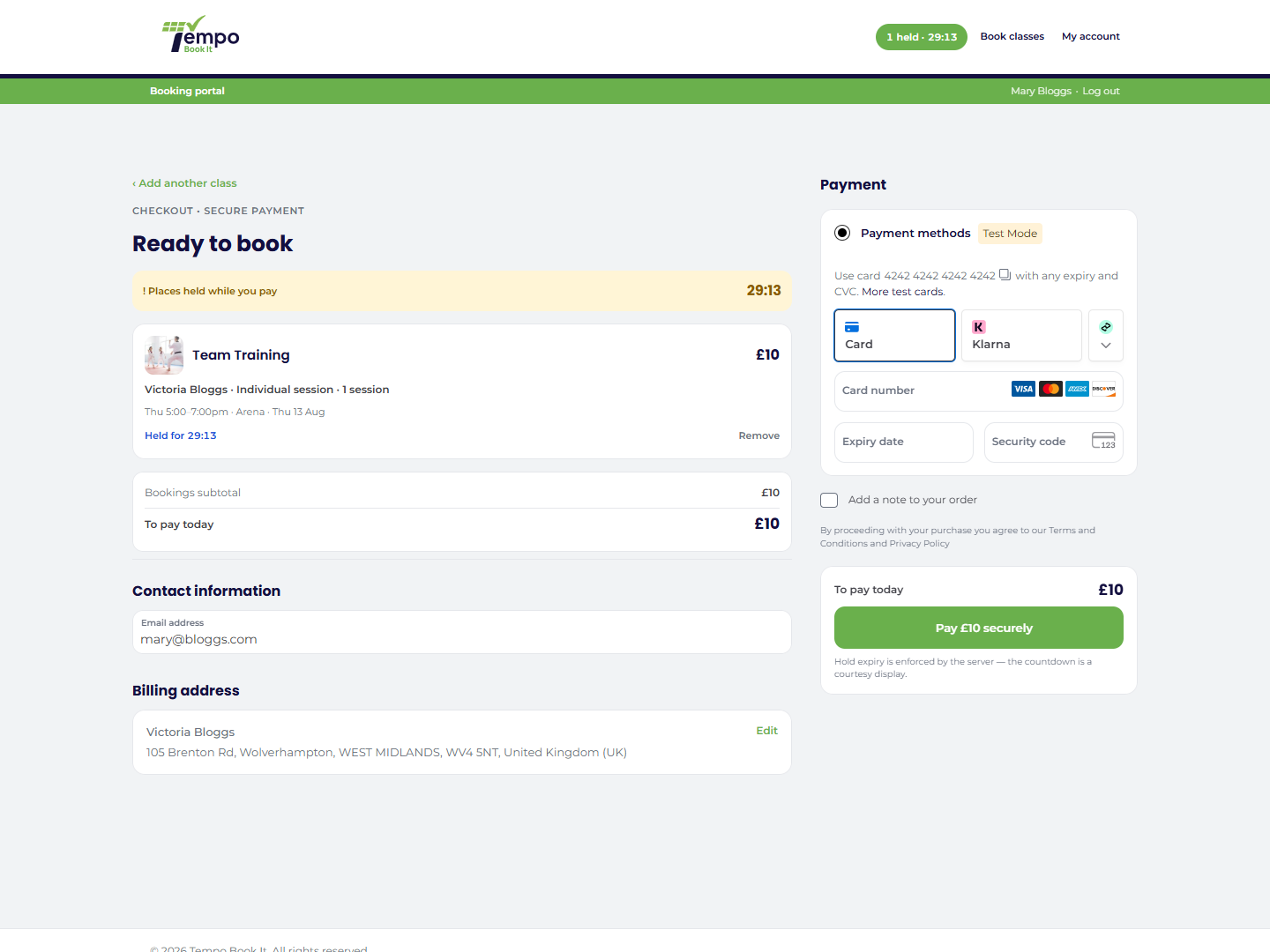
Checkout is your normal WooCommerce checkout with Tempo's booking panel alongside the payment form:
- an amber "Places held while you pay" banner with the soonest expiry counting down;
- one card per booking: class, student, package, dates, its own live countdown (turning amber under five minutes, and flipping to "Hold expired, places released" at zero) and a Remove link;
- the account credit toggle, where members apply their credit balance (How booking credit works);
- a totals card: subtotal, credit applied, to pay today.
On mobile, a sticky "Pay £X securely" bar keeps the payment action in reach; when credit covers everything it reads "Place order, nothing to pay today". And when the chosen payment method takes members elsewhere to pay, the bar says so honestly: pick PayPal and it reads "Proceed to PayPal" rather than promising to take the payment on the spot, with the amount still shown on the "To pay today" row just above. A parent pays for several children's bookings in one order.
The countdown display is a nicety; the timekeeping is the server's. Even with JavaScript off, expiry is enforced and credit amounts are checked and capped on the server. Nothing about overbooking protection depends on the member's browser.
Checkout layouts
Tempo → Settings → Booking & checkout → Checkout layout offers three arrangements: the designed default (booking panel main, payment form in a sticky sidebar), the mirrored version, and Minimal, which leaves your theme's checkout completely alone and just adds the essentials above the payment form. Minimal is the safe choice for a heavily customised existing shop. In every layout the payment form itself is WooCommerce's own; Tempo never replaces it.
The safety net behind it all
Whatever route a payment takes (instant card, delayed confirmation, a member sitting in a payment popup past the hold's expiry), availability is re-checked at the moment the booking is actually confirmed. The outcomes of that final check, including the rare "paid after the hold lapsed and the place went to someone else" case, are covered in How bookings become orders.
Thanks. That helps us improve these guides.
Thanks for letting us know. Ask us on the Support page and we'll help directly.