

Browse docs
Setting up teachers and register access
Create teacher accounts, hand out the register link, and get PINs set before the first class.
Five minutes per teacher, once. Here's the checklist.
Your site may use different words. Tempo lets you rename class, student and teacher under Settings → Branding & vocabulary; these docs use the defaults.
1. Create the teacher account
On the members screen (Tempo → Students → Add new students), create the teacher as a Teacher account type with their email; they'll get a password set-up link. Then assign them to their classes on the timetable, which is what puts their classes first in their register view.
Teacher accounts are deliberately trimmed: no booking or shopping tabs, no customer emails, just the register and a Teacher PIN page in My Account. Office staff who also teach (shop managers, administrators) keep their full accounts and can use the register too.
2. Give them the register link
The register page was created at install (Creating your booking and register pages). Send teachers the URL; on a phone, "add to home screen" makes it feel like an app. The page requires login and register access; a parent who stumbles on it sees a polite no-access message, nothing more.
3. Have them set their PIN
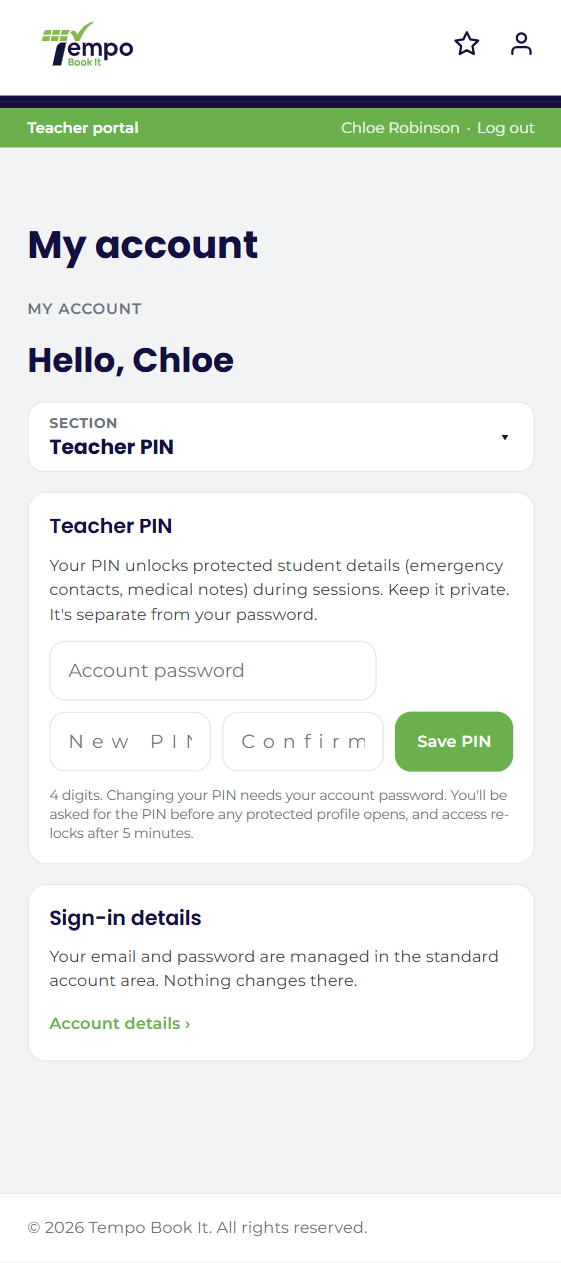
Before a teacher can open protected student profiles (emergency contacts, medical notes), they must set a 4-digit PIN under My Account → Teacher PIN. Setting or changing it always requires their account password. Make this part of onboarding, because the first time they *need* a protected profile is exactly the wrong moment to be setting a PIN.
What teachers can and can't do
Teachers can view registers and mark attendance on the day, and view protected profiles behind their PIN. They can't amend past registers (that's office-level), can't see bookings, money or reports, and can't reach Tempo's admin. The full permission model is capability-based underneath, so a developer can fine-tune; the defaults fit almost every club.
Cover teacher tonight? Any teacher account can see all classes via "Show all classes", so cover needs no setup. If someone external covers regularly, give them a proper teacher account; walk-in marks and profile views are audited per person, and that's worth keeping accurate.
Thanks. That helps us improve these guides.
Thanks for letting us know. Ask us on the Support page and we'll help directly.