

Browse docs
Protected student profiles and the teacher PIN
Emergency and medical details at the door when needed, locked everywhere else.
A teacher at the door sometimes needs a child's emergency contact or medical notes *right now*. A lost phone in a café must never give those details to anyone. Protected profiles are how Tempo holds both truths at once.
Your site may use different words. Tempo lets you rename class, student and teacher under Settings → Branding & vocabulary; these docs use the defaults.
How it works at the register
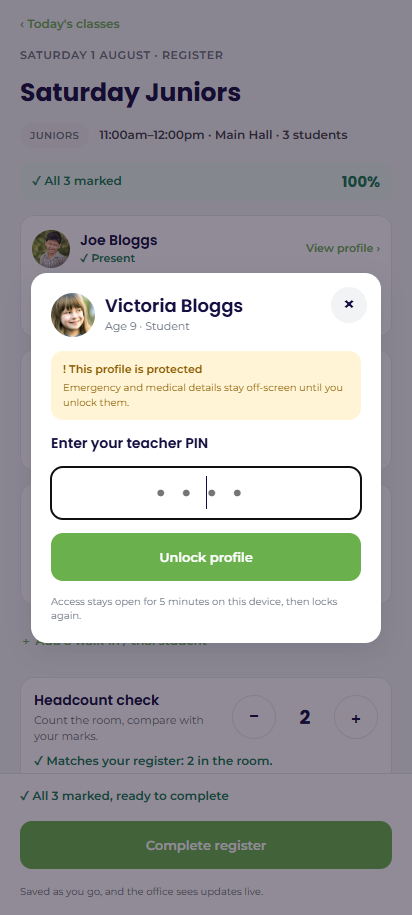
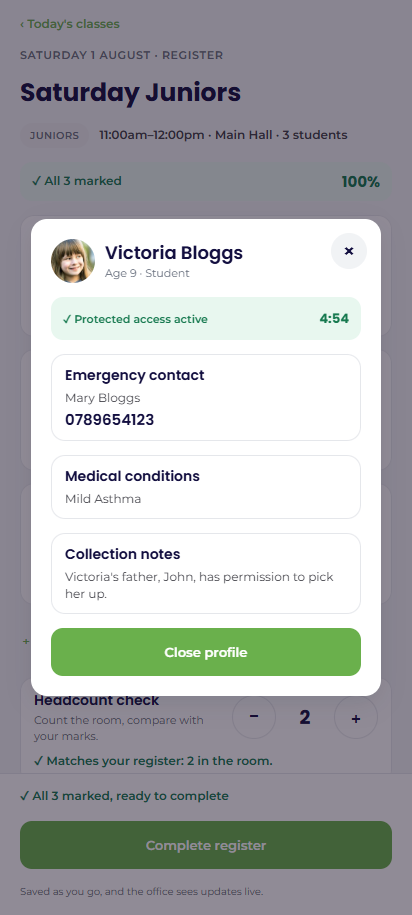
Every booked student's card offers View profile. The popup shows the child's basics, but the three sensitive cards (emergency contact, medical conditions, collection notes) stay off-screen until the teacher enters their 4-digit PIN.
One correct PIN opens a short access window (default 5 minutes, adjustable under Tempo → Settings → Registers & staff) shared across all profiles, with a visible countdown; then it re-locks. The window is enforced on the server and tied to that login on that device; a colleague's phone stays locked. Five wrong attempts trigger a one-minute lockout. Every unlock and every profile view is written to the audit log, by name.
The amber dot
An amber "!" dot on a student's avatar tells the teacher a medical note exists, without revealing anything. It's visible before any PIN is entered, so a teacher can know to look before class starts, and it deliberately stays on even if the stored note can't currently be read; a safeguarding flag must never switch off because of a storage fault.
How the data is protected underneath
Parent/guardian, emergency and medical fields are stored encrypted in the database. They're the same fields families maintain on My Account and the office edits in the directory, all through one guarded reader and writer. PINs are stored only as hashes and never logged.
The system also fails safe: if a stored value can't be decrypted, the card says "Details are on file but could not be read — contact the office", in red. It never falls back to "no known medical conditions", because unreadable must never masquerade as none. If you ever see that message, act on it: A protected profile says details could not be read.
Who else can see protected details
Office staff with protected-profile access see the same three cards on the directory's student pages, with the same audit trail. Staff without it see a short note instead, and the values are never even read from the database. Members see their own children's details only, behind their account password, on My Account.
Thanks. That helps us improve these guides.
Thanks for letting us know. Ask us on the Support page and we'll help directly.