

Browse docs
Creating duration products
Create the hidden WooCommerce products that hold your prices; one per price point.
Read How pricing works first if you haven't; this article is the doing, that one is the why.
Your site may use different words. Tempo lets you rename class, student and teacher under Settings → Branding & vocabulary; these docs use the defaults.
Before you start: your durations
The list of durations your timetable offers lives under Tempo → Settings → Timetable → Class durations: minutes, one per line or comma-separated. The default is 30, 45, 60; add whatever you run (90 for a double, 480 for a full-day workshop). Session end times and clash checks work with any value.
Durations and prices are separate on purpose: the duration is *how long*, the product is *how much*. You only need a product for each price point; if 30- and 45-minute classes cost the same, one product can serve both.
Create each product
For each price point:
- Go to Products → Add New (this is WooCommerce's screen, not Tempo's).
- Name it internally: "45-minute class", "2-hour workshop". Members never see this name.
- Set the Regular price: the standard single-session rate for every class using this product.
- In the same General tab, below the price, fill in the two Tempo fields: Either can be left empty; missing rates fall back sensibly (full-term falls back to half-term, half-term to the regular price).
- Half-term per-session rate: the discounted rate for half-term packages.
- Full-term per-session rate: the discounted rate for full-term packages.
- Set Catalogue visibility to Hidden (in the Publish box), then Publish.
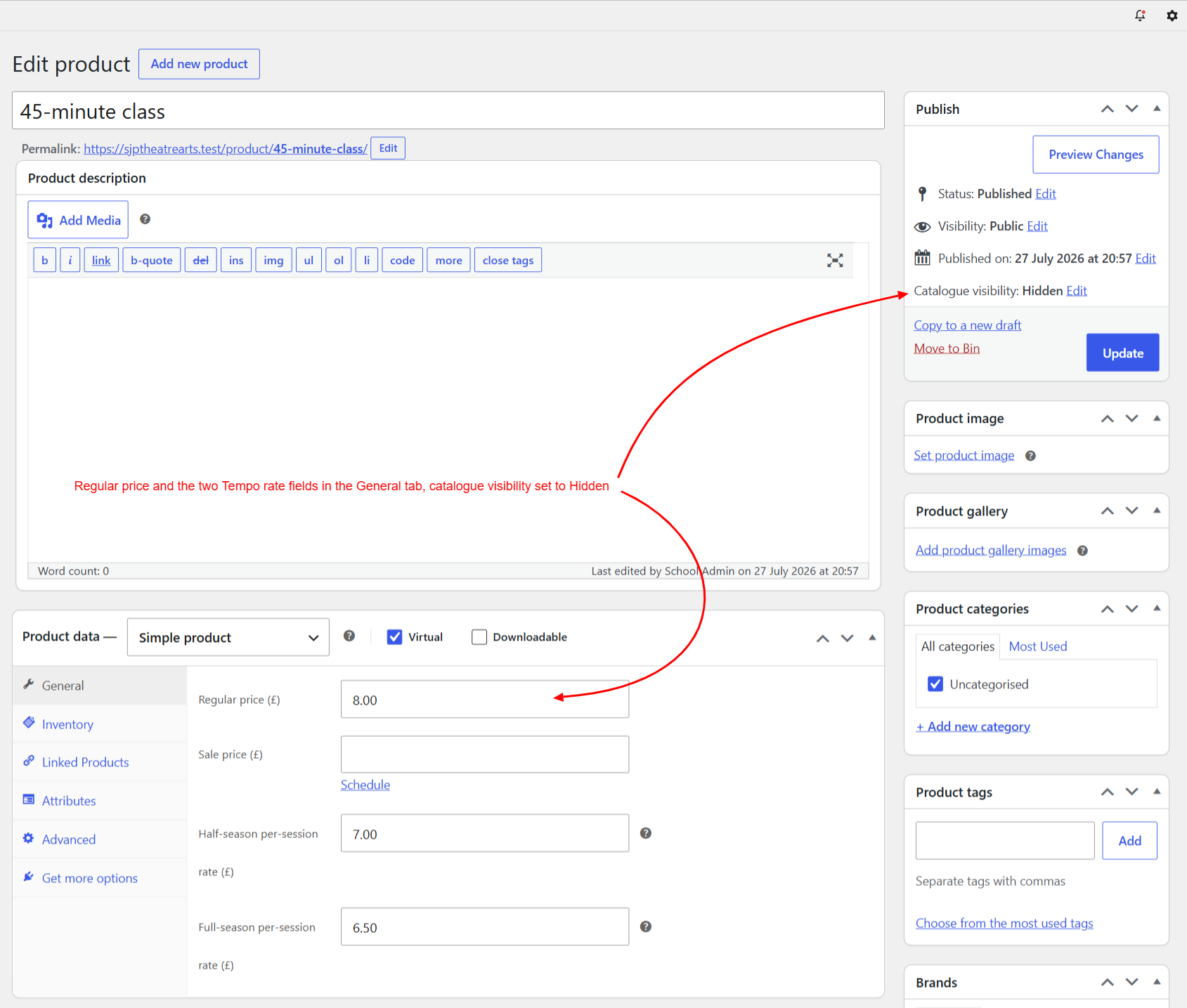
A worked example:
| Field | Value | What a parent pays |
|---|---|---|
| Regular price | £8.50 | £8.50 per single session |
| Half-term per-session rate | £8.00 | 6-session half term = £48.00 |
| Full-term per-session rate | £7.50 | 12-session full term = £90.00 |
Connect classes to it
Every timetable entry picks its duration product; that's the moment a class gets its pricing. See Building the timetable.
Changing prices later
Edit the product and save: every class pointing at it now charges the new rates for new bookings. Already-paid bookings are orders in your records and never change retrospectively. For a new term at new prices, the tidy pattern is to update the products between terms, before duplicating the term opens booking.
Don't delete a duration product that classes have used; unhook it from timetable entries first. And resist "tidying" these products into your public shop; hidden is exactly where they belong.
Thanks. That helps us improve these guides.
Thanks for letting us know. Ask us on the Support page and we'll help directly.