

Browse docs
The send log, and previewing change notices
Proving what was sent, and the never-automatic flow for cancellation and reschedule emails.
Two subjects share this article because they share a purpose: being certain about what your members were told.
Your site may use different words. Tempo lets you rename class, student and teacher under Settings → Branding & vocabulary; these docs use the defaults.
The send log
Tempo → Emails → Send log records every send attempt the plugin ever makes: template, recipient, subject, the booking or order it relates to, and sent or failed, with filters to find anything. Use it for:
- "We never got the email": find the row. If it's there and sent, the mail was handed off and the conversation moves to spam folders and address accuracy. If it's failed, your site has a sending problem; see Emails not arriving.
- "What exactly were families told?": the log ties each send to its booking, so you can reconstruct any family's communication history.
Messages members send from the Need help page land here too, under their own help-request category, so "did my message reach support?" has the same one-look answer as everything else.
"Sent" means your WordPress handed the email to the sending machinery, not that it reached an inbox. Delivery beyond that point is your site's email reputation, which an SMTP plugin does wonders for.
Change notices: never automatic, always previewed
When you cancel or reschedule a booked session (or edit its location or teachers), no email goes out by itself. The session is flagged, and its edit screen shows the Notify affected customers panel: who will receive it, the original-versus-new comparison, a box for your own message, and a preview of the actual email. You send it when you're ready, once; a resend needs a fresh edit, so nobody can accidentally spam families with duplicates. Dismissing drops the flag without sending, for changes not worth an email.
Details worth knowing:
- Repeated edits before sending keep the original details for the comparison, so families are shown the change from what they knew, not from an intermediate edit.
- Bookings already resolved with credit through the outcomes panel have their credit amount stated in their copy; unresolved ones read "outcome being arranged".
- Reinstating a cancelled session whose notice was sent flags a matching "going ahead after all" notice through the same panel. Restoring a session nobody was told about just clears the flag; nobody needs un-telling.
- Editing a whole timetable entry (rather than one session) flags every affected booked session the same way, each with the same previewed notice; see Building the timetable.
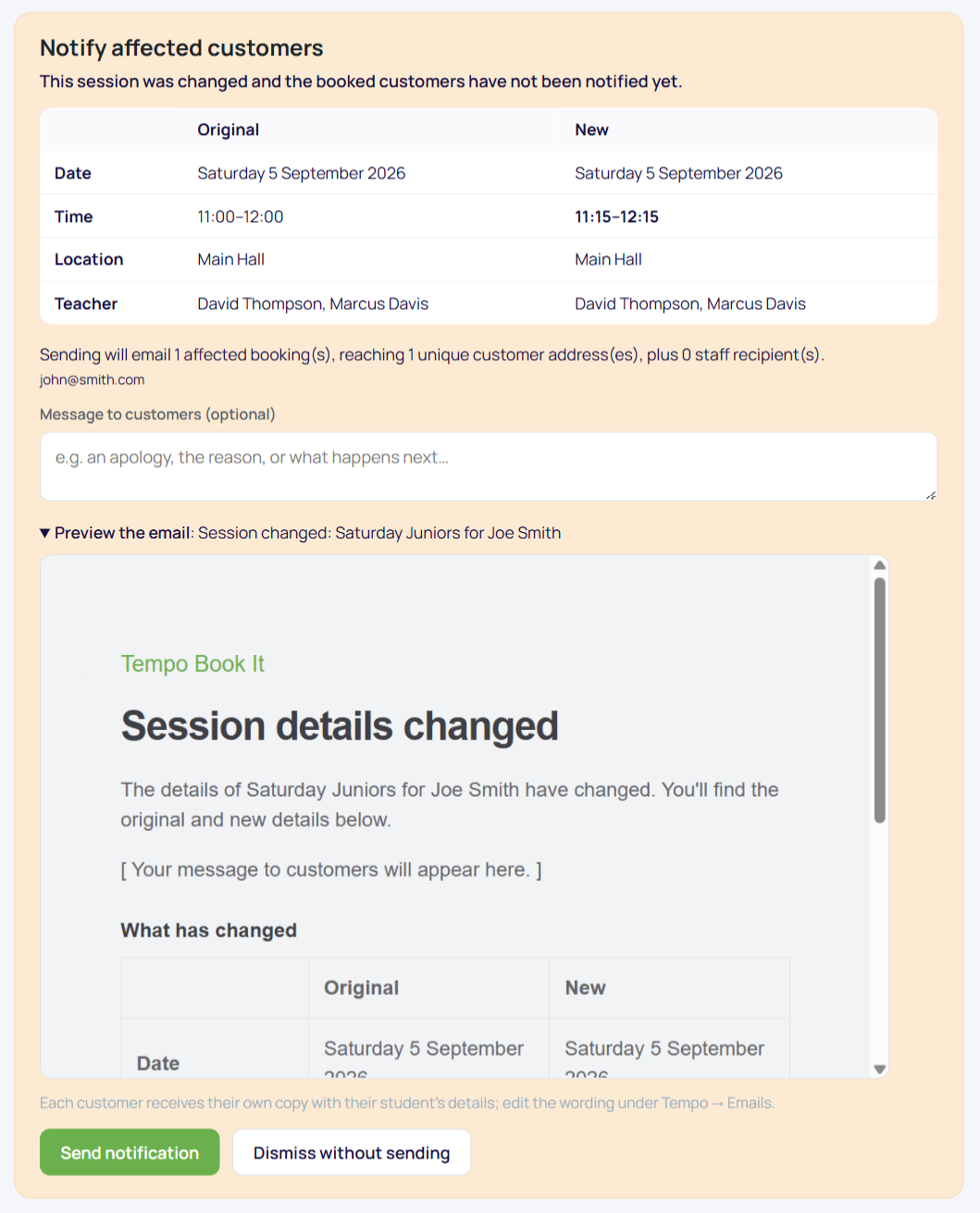
One staff summary copy goes to the school-changes recipients per send, and every send lands in the log like everything else.
Thanks. That helps us improve these guides.
Thanks for letting us know. Ask us on the Support page and we'll help directly.